Make Review (2026): Two Setup Traps Cost an Hour
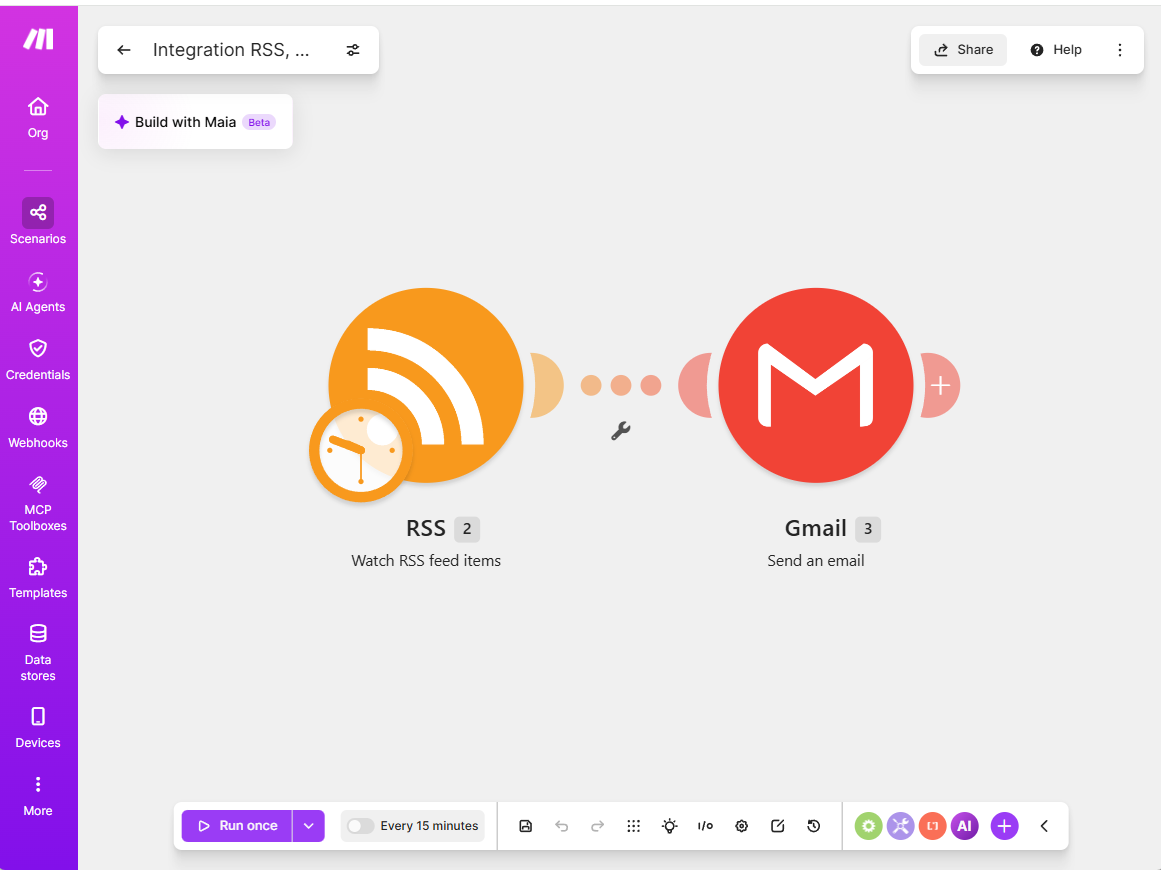
We signed up for Make’s free plan (no credit card required) and built a simple real scenario: watch this site’s target RSS feed for new items, and send an email notification when one appears. This is a genuine building block for our own content pipeline, not a synthetic test.
Signup and builder experience
Onboarding was quick — a short wizard asked what we wanted to automate, which apps we use, and workspace size, then dropped us into the scenario builder. Adding the RSS “Watch RSS feed items” trigger and a Gmail “Send an email” action, and connecting them, took a few minutes. The visual builder is genuinely intuitive.
What actually went wrong (and the fix)
Getting the scenario to run correctly took about an hour of debugging, for two reasons:
1. A form validation bug that looked like a real error. Saving the Gmail module repeatedly failed with “Body type: Value must not be empty” — even though “Raw HTML” was visibly selected in the dropdown. The fix was re-opening the dropdown and re-selecting the same value before saving. This happened on two separate attempts to configure the same module.
2. Minimal OAuth scopes broke the integration (our August description was partly wrong; see the correction).
(Correction, October 11, 2026: our August description of this problem was partly wrong. We re-tested it on the free plan with a fresh Gmail connection and found two separate things that we had merged. First, with only the “send” permission granted, the Gmail module fails visibly when it runs: the module shows a red Error badge and the log has a red line, [403] Request had insufficient authentication scopes. Second, a scenario can look fully successful and still send nothing when the RSS trigger has no new items to pass on (the default start point is “From now on”): the RSS module shows a green check, the Gmail module never runs, and every log line is green. We can’t reconstruct exactly what happened in August; the second case matches what we described and is the likelier explanation, so please don’t rely on the claim below that scope errors fail silently. What did hold up: adding the missing permission afterwards did not fix it (Google listed both permissions, yet the same 403 came back), and revoking Make’s access in the Google account, then creating a fresh connection with both boxes ticked, did. One more difference: in August we wrote that Google silently skipped the scope-selection screen on a second connection attempt; this time it did not skip it, but showed a screen asking only for the one missing permission, with no checkboxes. Step-by-step fix with screens: Make Gmail 403 insufficient authentication scopes.)
Our original August account follows, kept as written. Following good security practice, we initially granted Make’s Gmail connection only the “send” scope, not the broader “view messages” scope. The scenario then ran with zero errors in the main execution log — the RSS trigger showed a successful checkmark, but the Gmail step never executed and no email arrived. There was no error visible anywhere in the standard run log.
The fix that actually surfaced the problem: right-click the Gmail module and use “Run this module” to test
it in isolation, bypassing the trigger. That immediately returned a clear error: [403] Request had insufficient authentication scopes. The full-scenario log never showed this — it just reported the run as
“completed.”
Re-authorizing with both scopes granted didn’t work on the first attempt either, because Google silently
skipped the scope-selection screen on a second connection attempt (it appears to reuse a prior grant). We had
to manually revoke Make’s access at myaccount.google.com/permissions to force a fresh consent screen with
the checkboxes, then it worked immediately.

Takeaway: if a Make scenario “completes successfully” in the log but a downstream step visibly didn’t run, don’t trust the top-level log — right-click the suspect module and run it in isolation. And if you’re granting only the “send” permission, expect a visible 403 when the Gmail module actually runs.
The free-tier trap that matters most
The free plan includes 1,000 operations/month, with no card required. That sounds generous, but polling triggers consume an operation on every check, whether or not new data is found. Left on the default schedule (every 15 minutes), the RSS watcher alone burns roughly:
4 checks/hour × 24 hours × 30 days ≈ 2,880 operations/month
— nearly triple the free allowance, from a single trigger with no actual output. Dropping the schedule to every 6 hours brings that down to roughly 120/month, comfortably inside the free tier. If you’re testing Make on the free plan, set the schedule interval deliberately before you forget about it (our guide to how Make and n8n count an empty poll has the numbers) — the default frequency is not free-tier-appropriate for a always-on trigger.
(Update, October 22, 2026: Make now calls these units credits, and one operation is one credit for non-AI apps, so read “operations” above as “credits”. We re-checked its pricing page on October 12: the free plan still has 1,000 credits a month, and it also allows only 2 active scenarios at a time, which this review did not mention. Our run history confirmed that an empty check costs 1 credit; the numbers are in our guide to how Make and n8n count an empty poll and in what Make’s free plan actually gets you.)
Bottom line
Make’s builder and free tier are real and usable — this wasn’t a paywall trick, and the automation now works correctly. But two things cost us real time: a UI validation bug on the Body type field, and the fact that a Gmail connection granted only the “send” permission fails with a 403, and adding the missing permission afterwards doesn’t fix it (see the correction above). Budget time for both if you’re setting this up yourself, and check your schedule interval before you walk away from a free-tier scenario.
See our Make vs n8n comparison for how it stacks up against n8n on the exact same task, or the three-way automation benchmark including Activepieces too.
To build the scenario we tested, see our RSS-to-Gmail tutorial for Make’s free plan. To work out how long the free credits last on your own schedule, use the Make credit calculator.
This is an affiliate link — see our disclosure policy.