How to Sanity-Check Your First Backlink Report
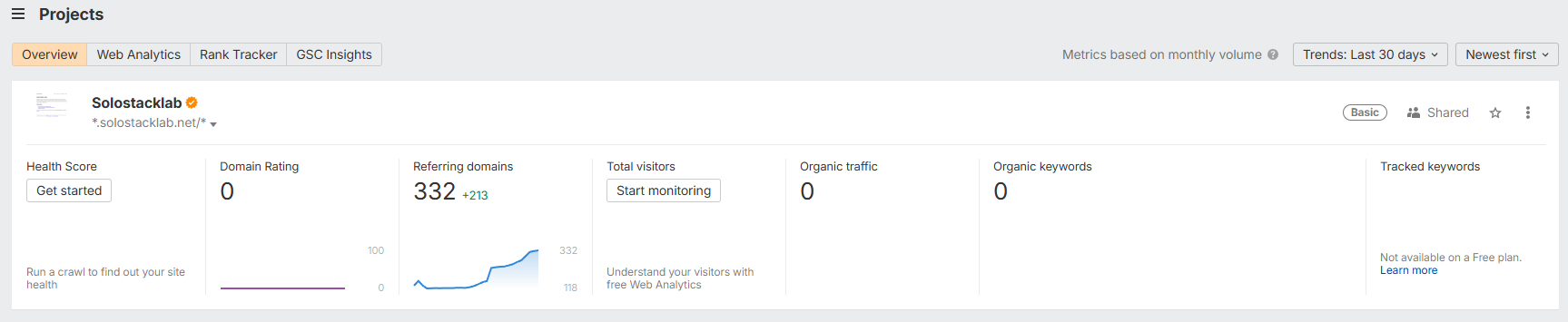
Ahrefs Free told us this site had 332 referring domains. For about a minute, that felt like real progress. Then we opened the list and found one genuine link. The other 331 were spam Ahrefs itself flags. We wrote about that on Indie Hackers, and the replies (thanks to everyone who commented, several of the steps below came directly from that thread) turned into a clearer version of the process than the one we actually used. This is that process, written so the next person doesn’t need a comment section to find it.
Step 1: check two sources, not one
Google Search Console has a “Links” report. For this site, it has shown “processing data, check again in a day” since launch and never produced a single result, not even the one genuine link we know exists. If you only look at GSC, the honest answer is “we don’t know.” That’s why we signed up for Ahrefs Free in the first place: not because GSC was wrong, but because it had nothing to check itself against.
If your two sources agree, that’s a real signal. If one is empty and the other shows a large number, the large number is the one you need to verify before repeating it anywhere, not the one you get to celebrate.
Step 2: read the rows, not the total
The count on a dashboard is a sum. It has no opinion about which of the domains behind it are real. Sort the referring-domains report by Domain Rating and read down the list instead of trusting the number at the top.
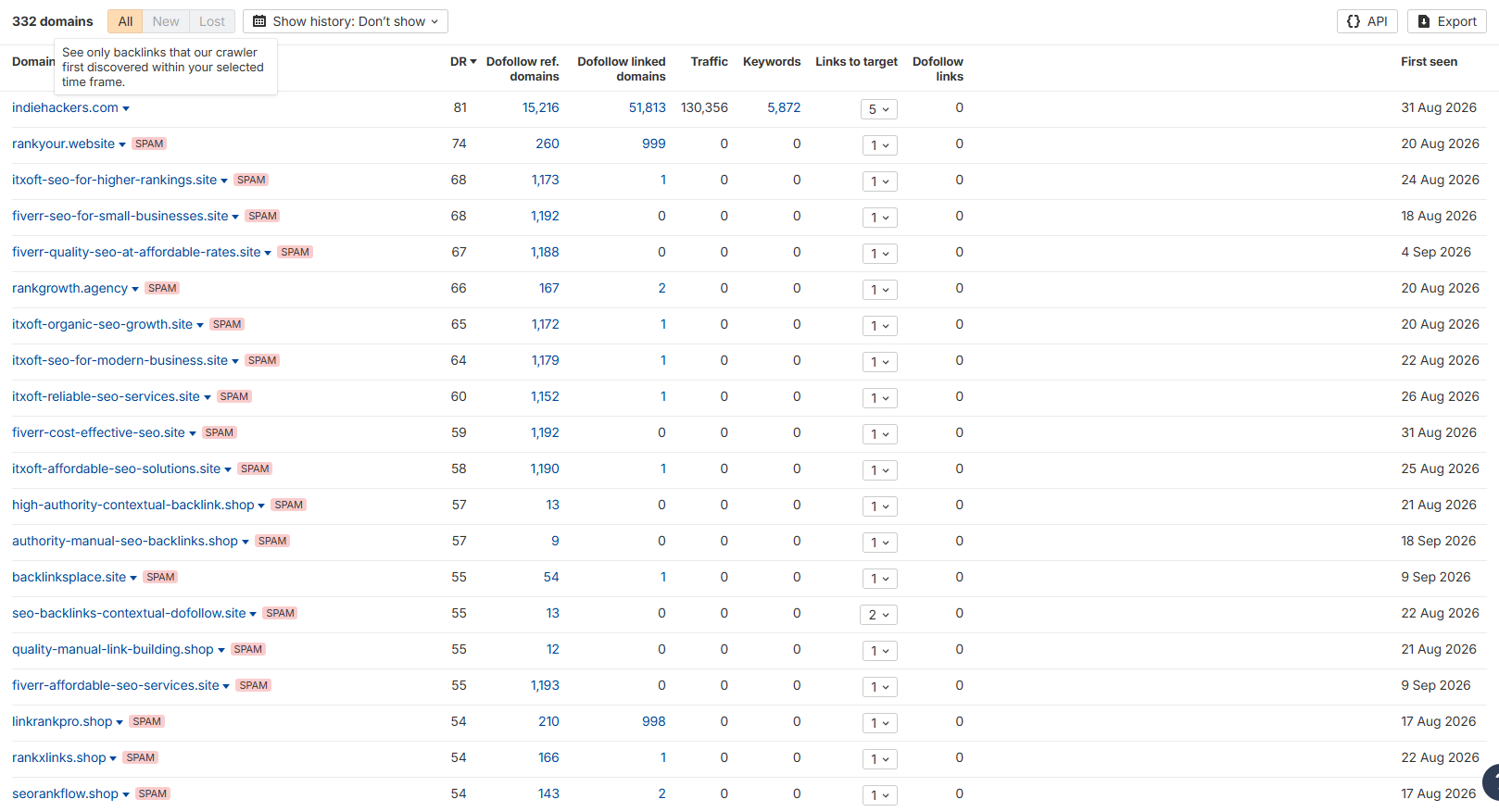
In our case, almost every row past the first carried a red SPAM label that Ahrefs applies on its own, not
something we had to judge by eye. One linking page still had the literal placeholder text {site_name}
where our domain should have been, which is about as clear a tell as it gets that the page was
auto-generated. A real link usually comes with a real page around it: an actual sentence, an actual byline,
a site you could plausibly visit for reasons that have nothing to do with your domain.
Step 3: watch the growth rate, not the total
The number itself was less useful than how fast it moved. Our 332 had grown by 213 in the previous 30 days. A backlink count that grows in occasional, small steps looks like organic discovery. A count that jumps by triple digits in a month looks like a domain that got added to a list somewhere and is now getting auto-inserted into a rotating set of junk pages. If your referring-domain count spikes, check the “first seen” dates on the new rows before assuming anything changed about your actual reach.
Step 4: decide disavow vs. ignore, and know why
Google’s own Search Console help says most sites don’t need the disavow tool at all, that it’s meant for sites with many spammy links actually causing or likely to cause a manual action, and that Google works to stop other sites’ link behavior from hurting yours. We didn’t disavow anything.
Our own reasoning, not a claim Google makes directly: links this obviously spammy are plausible candidates for Google’s own systems to already be discounting on their own, without you doing anything. We have no way to confirm that for our specific case, but it’s consistent with Google saying most sites don’t need to disavow at all. Reserve disavow for a link pattern you have actual evidence is hurting you, such as a ranking drop that tracks with the spike or a manual action notice in Search Console, rather than for a scary-looking total by itself.
Step 5: check your own site while you’re in there
Two things came out of this that had nothing to do with backlinks at all, so it’s worth using the same audit session to check both:
- robots.txt. Pull it up and read it, not just check that it exists. A single overly broad
Disallowline can quietly block a real page from being crawled at all, and nothing about a clean-looking site will tell you that on its own. - Every URL in your sitemap. Request each one and check the actual status code, not just that the page
“looks fine” in a browser. We ran this on our own sitemap while writing this guide:
robots.txtwas allow-all, and all 32 URLs in it returned 200. Nothing wrong this time, but it’s the kind of check that would have caught a real bug we found a different way a few days earlier: every URL that doesn’t exist on this site was quietly returning 200 with the homepage instead of a proper 404 (see the correction below). We found that from Cloudflare’s bot-traffic logs, not from checking our own sitemap, so the two checks catch different things and it’s worth running both.
The claim that needed the same treatment
The backlink number wasn’t the only thing we’d trusted without re-checking. Our own Semrush review said the
www version of this domain redirected to the main one. It didn’t, it served a full duplicate copy of the
site with a 200 status, for four weeks, because we wrote the claim once and never tested the actual live
URL again. We fixed the redirect and added a dated correction to that review instead of quietly editing the
sentence. The lesson that generalizes: anything you’ve published as a fact about your own site’s behavior
is a claim, not a fact, until you’ve re-tested the current live state, not just remembered writing it down
correctly at the time.
Checklist
- Compare at least two independent sources (e.g. Ahrefs Free and Google Search Console’s Links report) before trusting either one’s headline number.
- Sort referring domains by DR/authority and read the actual rows, not just the total.
- Check “first seen” dates on any recent spike before treating new links as a genuine trend.
- Look for a spam-detection label your tool applies automatically, and don’t override it without a specific reason.
- Decide disavow vs. ignore based on evidence of harm (ranking drop, manual action), not on the size of the number.
- Read your own robots.txt in full, don’t just confirm it exists.
- Request every URL in your own sitemap and check the status code, not just that it renders in a browser.
- Re-test any claim you’ve published about your own site’s current behavior before repeating it again.
See our Ahrefs Free review for the full backlink-checking session this guide is based
on, and our Semrush review for the dated correction on the www claim.
Tools mentioned in this guide
| Tool | Best for | Starting price | Free trial |
|---|---|---|---|
| Ahrefs | seeing who actually links to your own site, for free, telling real backlinks from auto-generated spam on a new domain | Free for verified sites; paid plans from ¥19,900/mo (Lite) on the pricing page as shown to a Japan-based visitor on Sep 20 2026 (the Ahrefs Free page also advertises a Starter plan at ¥4,460/mo) | Ahrefs Free (formerly Webmaster Tools): $0 for websites whose ownership you verify, unlimited verified sites, no card asked at signup (confirmed firsthand Sep 2026). Site Explorer shows up to 1,000 backlinks/keywords at once, Site Audit gets 5,000 crawl credits/month, Web Analytics up to 1M events per project. Data export and tracked keywords need a paid plan. Ahrefs says it never runs discounts or free trials otherwise. |
| Semrush | free technical site audits without a card, cross-checking AI-search-visibility findings against a second tool | $139.95/mo (Pro, monthly - not tested firsthand) | Free, no-signup, no-card tier covers Site Audit (up to 100 pages), AI Visibility, and limited Position Tracking (confirmed firsthand Aug 2026). The 7-day trial of paid plans requires a credit card, and its money-back guarantee explicitly excludes month-to-month billing - the same refund-guarantee trap shape found in the Surfer SEO review. Stayed in the free tier deliberately for this review. |