Free Work Email for Affiliate Signups (Cloudflare Routing)
Two sign-up forms we used this year would not take a Gmail address. SE Ranking’s trial signup rejected it in August, and on October 25 the form for Pipedrive’s affiliate program said that applications without a work email address will not be considered. Our fix both times was a free address on our own domain that forwards to our existing Gmail inbox, made with Cloudflare Email Routing. This page covers what it is, the setup steps from Cloudflare’s own docs, what ours looks like, and the one thing that surprised us. There is no affiliate link on this page.
What you need
- A domain whose DNS is on Cloudflare. Cloudflare’s docs say Email Routing requires Cloudflare DNS.
- A mailbox that will receive the forwarded mail, such as the Gmail account you already use.
Setup, as Cloudflare’s docs describe it
We read these steps on October 30, 2026. Our own address was set up earlier in the year, so we did not re-record every click today; the screens below show the finished setup.
- In the Cloudflare dashboard, open Email Routing and choose to onboard your domain. Cloudflare adds the DNS records for you: MX records, an SPF TXT record and a DKIM TXT record. The docs say changes usually take 5 to 15 minutes and can take up to 24 hours.
- Add a destination address (your Gmail) and click the verification link Cloudflare emails to it.
- Create a routing rule. Enter the part before the @ (we used
admin), choose “Send to an email” as the action and pick the verified destination. - Test it by sending a message from a different account. The docs say to use another account because some providers discard mail that appears to come from the account it is being delivered to.
What ours looks like
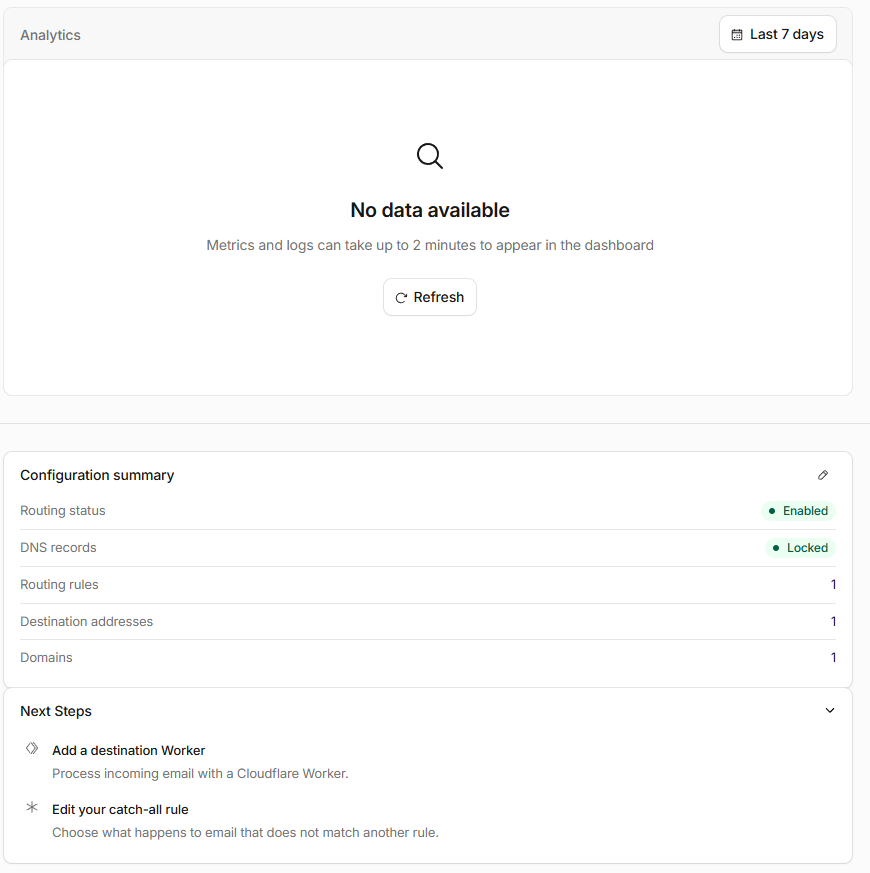
The overview page showed Routing status “Enabled”, the DNS records “Locked”, one routing rule and one destination address.
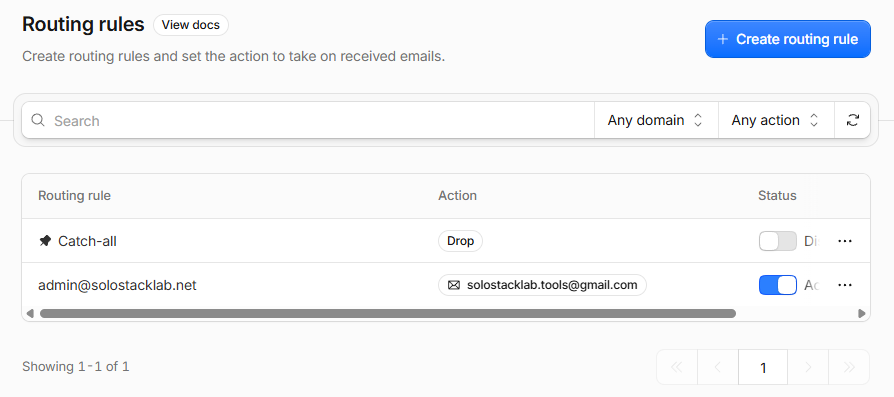
The rules list has two lines. [email protected] forwards to our business Gmail and is active. The “Catch-all” rule,
which handles mail sent to any other address on the domain, is set to Drop and switched off, so nothing else gets through.
It worked, and the first test went to spam
The forms accepted the new address. SE Ranking’s signup passed it, and Pipedrive’s application form accepted it and showed its “application received” page. We have not heard back from Pipedrive yet, so we can’t say whether the address helped or hurt.
When we sent ourselves a test message from a personal account, it arrived in Gmail’s spam folder. We don’t know why, and we did not change anything to fix it. Cloudflare’s own test steps say to check your spam folder if the message does not show up, so this is a known thing to expect. If you are waiting for a reply from a program, look in spam as well as the inbox for the first few days.
What it costs and where it stops
- Cost: Cloudflare’s pricing page says inbound Email Routing is unlimited on both its Workers Free and Workers Paid plans.
- Limits: the docs list 200 routing rules per domain, 200 destination addresses per account and 25 MiB per inbound message. One rule maps to one destination.
- It only receives and forwards. If you reply from Gmail, the recipient sees your Gmail address, not your domain address. Sending as your domain address needs another setup that we have not tried. Cloudflare’s pricing page says sending to arbitrary recipients requires its Workers Paid plan.
What we didn’t test
Sending mail as the domain address, forwarding to a non-Gmail inbox, and whether other programs’ forms accept this kind of address. Two did. If a form checks more than the domain name, our result won’t apply. For the SE Ranking part of the story, see our SE Ranking review.