Microsoft Clarity Review (2026): Free, But Copilot Only
We signed up for Microsoft Clarity - confirmed directly on its own official FAQ before doing anything else: “Clarity is 100% free - forever. You’re never asked to upgrade to a paid version. No credit card is required to sign up.” This is a genuinely new category for this project: heatmaps and session recordings, not another SEO audit or content tool.
Getting real data, eventually
Installing the tracking snippet was a two-minute copy-paste into this site’s layout. Clarity’s own onboarding says data can take up to two hours to appear - in our case it took closer to a day, since this domain gets very little real traffic (a recurring fact of testing tools against a young, low-traffic site, documented across this project’s GSC and Cloudflare Analytics checks). Once it did, the dashboard showed real numbers: 3 sessions, 5.33 pages/session, 11.5% average scroll depth over a 3-day window - small numbers, but real ones, not placeholders.
Heatmaps and recordings: present, but our own traffic wasn’t enough to fill them in yet
We tried both the Click and Scroll heatmap views against a real published page
(solostacklab.net/reviews/activepieces/). Both came back empty - “We couldn’t find any clicks” / “We
couldn’t find any scroll information.” That’s an honest limitation of testing on a domain this size, not a
product failure: heatmaps need enough real visits on one specific URL to aggregate into anything, and this
domain doesn’t have that yet. Worth knowing if you’re a fellow low-traffic solo site: the recordings feature
works with far less data than heatmaps do (see below), so don’t judge Clarity’s usefulness by an empty
heatmap alone on a new domain.
AI Visibility: real, but narrower than the name suggests
Clarity’s homepage advertises AI Visibility as tracking “how your brand shows up in AI experiences.” We enabled it and checked the actual Citation dashboard. The first thing we noticed: the data source is explicitly labeled “Microsoft Copilot and partners.”
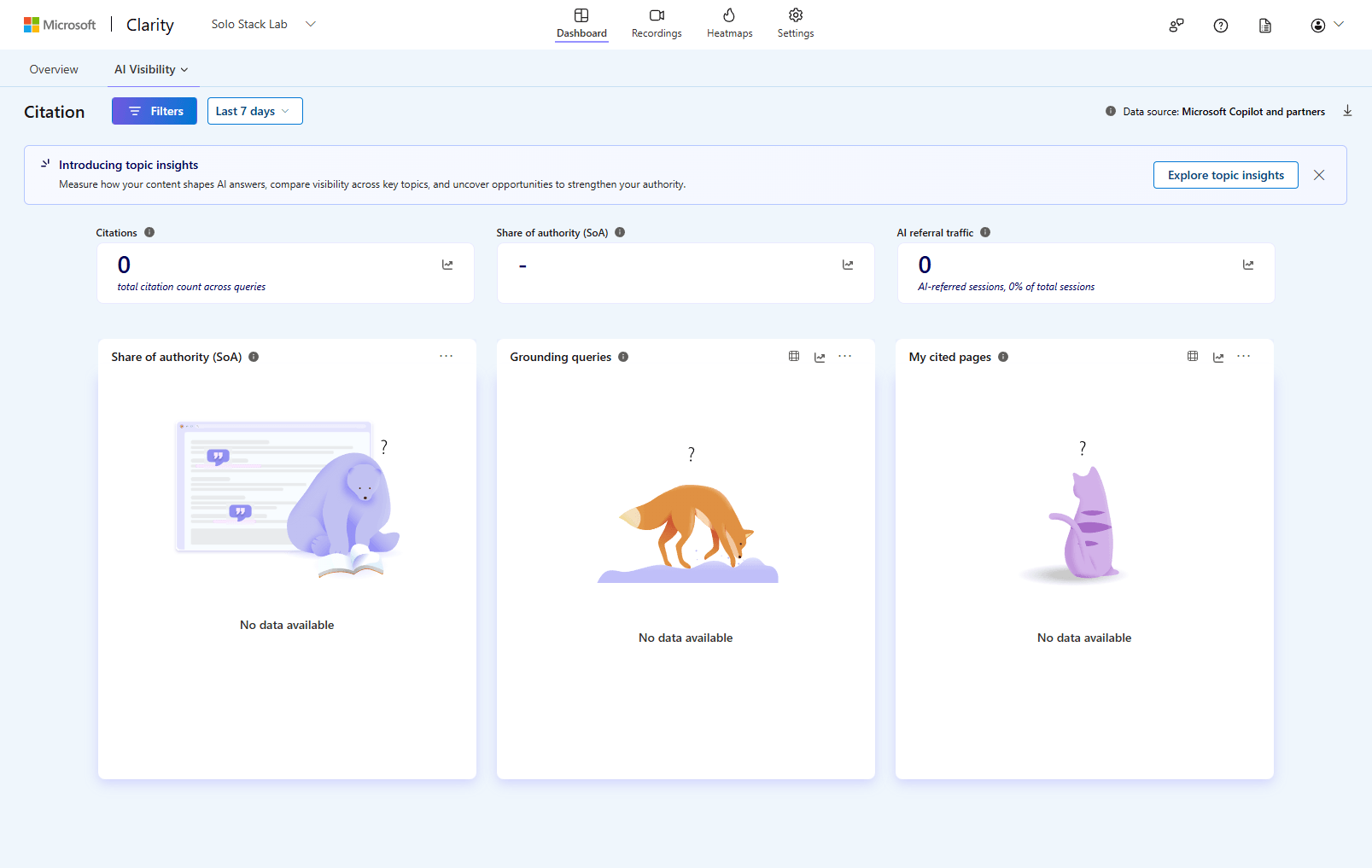
We checked the filter panel for a way to add ChatGPT, Gemini, or Perplexity as separate tracked engines - the options are period, query type (branded/non-branded), query text, and cited-page URL. There’s no platform selector. As far as we could confirm firsthand, Clarity’s AI Visibility tracks Copilot specifically, not the multi-engine citation presence that SE Ranking’s AI Search, Semrush’s AI Visibility, and NEURONwriter’s AI Visibility all track for this same domain.
The result itself - 0 citations, “-” for Share of authority, 0 AI referral traffic - is consistent with the 0% finding those other three tools already reported, and our own manual ChatGPT check. But it’s a fifth data point on a narrower question than it first appears to answer, not a straightforward fifth confirmation of the exact same thing.
The AI summary feature: a real example of why you verify AI output
Clarity’s “Summarize recordings” feature ran an AI summary over our one recorded session - which happened to be us testing the site’s dev server, not a real visitor. The AI’s summary was fluent, confident, and wrong about what actually happened:
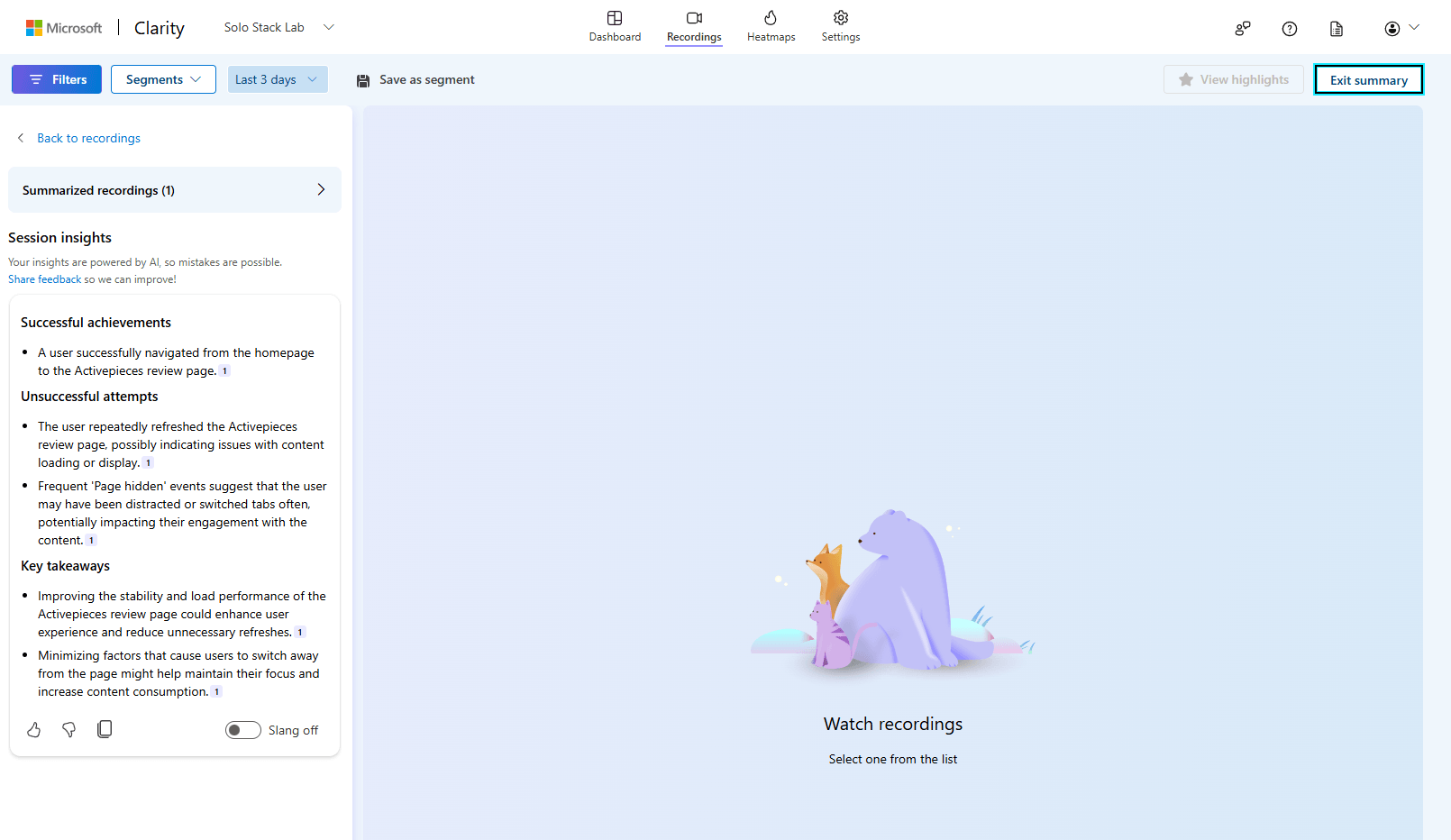
Under “Unsuccessful attempts,” it reported: “The user repeatedly refreshed the Activepieces review page, possibly indicating issues with content loading or display,” and “Frequent ‘Page hidden’ events suggest that the user may have been distracted or switched tabs often, potentially impacting their engagement with the content.”
Neither claim was true. That was this site’s own dev-server testing session - repeated page loads and tab switches from normal development work, not a frustrated visitor. Clarity’s own UI includes the caveat “Your insights are powered by AI, so mistakes are possible,” which is honest of it - but this is a concrete example of exactly that mistake happening, not a hypothetical one. Worth remembering before treating any AI-generated session summary as ground truth about real user behavior, on this tool or any other.
A side effect worth knowing: it doesn’t distinguish dev from production
Related to the above: Clarity’s tracking snippet fired identically on our local npm run dev server and on
the live production site, and both showed up as separate tracked URLs in the same project
(http://localhost:4321/... alongside https://solostacklab.net/...). If you’re testing changes locally
with the same tracking code installed, expect your own dev traffic to mix into the same dashboard as real
visitors unless you explicitly filter it out.
Affiliate program
Checked Clarity’s official site directly: no affiliate or partner program exists. Given the product has no paid tier at all, this isn’t surprising - there’s nothing to earn a commission on.
Bottom line
The core promise - free forever, no card, real heatmaps and recordings - held up, and the numbers we did get were genuine. AI Visibility is a real, working feature, but track what it’s actually measuring (Copilot specifically) before assuming it duplicates the ChatGPT/Gemini tracking other tools in this project already do. And its AI-generated session summaries are worth spot-checking against the actual recording before trusting them - ours got a plausible-sounding explanation confidently wrong.